
A free Canva template for reading journals, recommendations, analysis, and more!
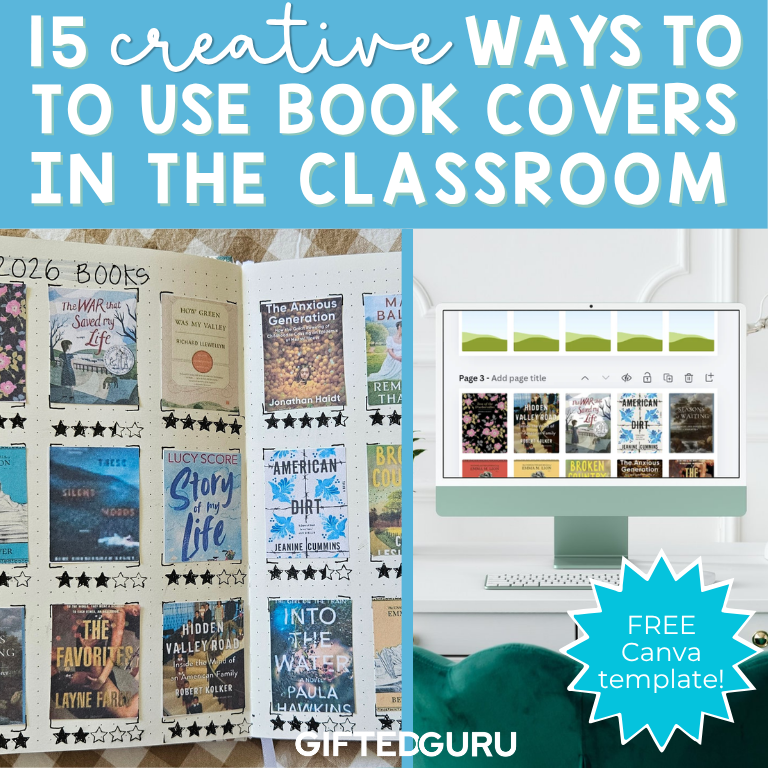
I love keeping track of the books I read, but a handwritten list does not capture the feel of a reading year for me. Book covers do. When I look at this spread in my reading journal, I can immediately remember the books, the order in which I read them, and how I felt about each one. Here’s a picture of a spread from this year (2026).
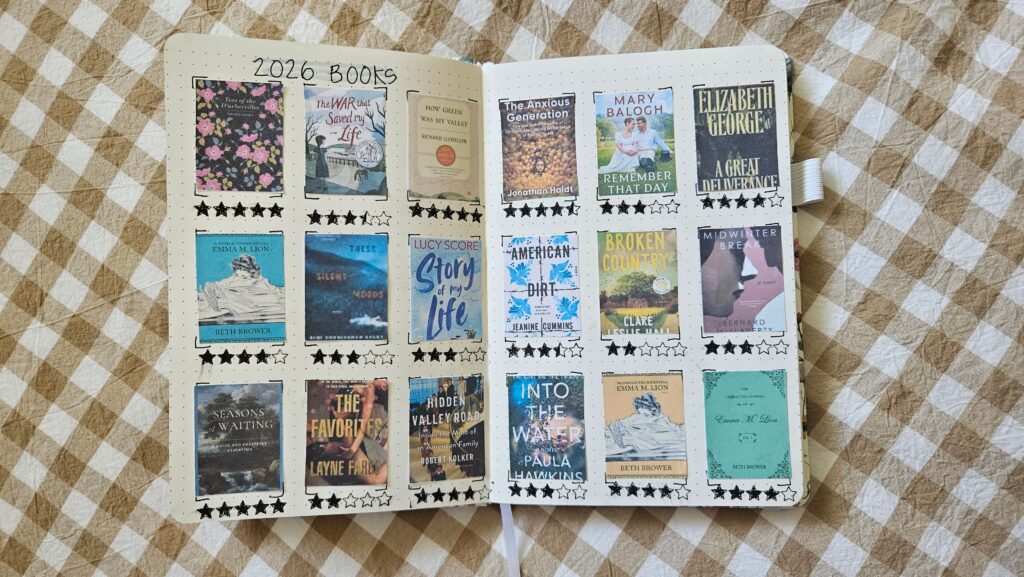
To make the spread, I created a Canva template that turns full-size book-cover images into printable miniature covers. I added the covers to my journal and added a simple five-star rating beneath each one using a stamp I got on Amazon (this is the link to my reading journal suggestions, including the stamp). The finished pages are colorful, personal, and much more fun to revisit than a list of titles.
As I was putting it together, I realized that these little covers could be useful in classrooms, too. Teachers can use them to track reading, introduce books, spark analysis, build text sets, and help students make thoughtful connections among books.
Four Miniature Book Cover Sizes
The Canva template includes four sizes, all arranged on standard letter-size pages:
1.5 x 2.25 inches: This is the size I used in my reading journal. It is a good choice for notebooks, reading logs, interactive notebooks, class charts, and larger collections of books. It’s quite small, so it’s efficient! (20 per page)
2 x 3 inches: This larger size works well for sorting activities, book recommendations, and lessons in which students need to study the cover closely. (12 per page)
3 x 4.5 inches: This larger size will be more visible from a distance. It’s a good choice for bulletin boards or other displays. Even though some of the template are oriented differently, Canva will handle that and the covers will be oriented correctly when you drag them in. (5 per page)
3 x 3 inches: This size works well for picture books with square covers. (6 per page)
You can use whichever size fits your project or print multiple sizes for different activities.
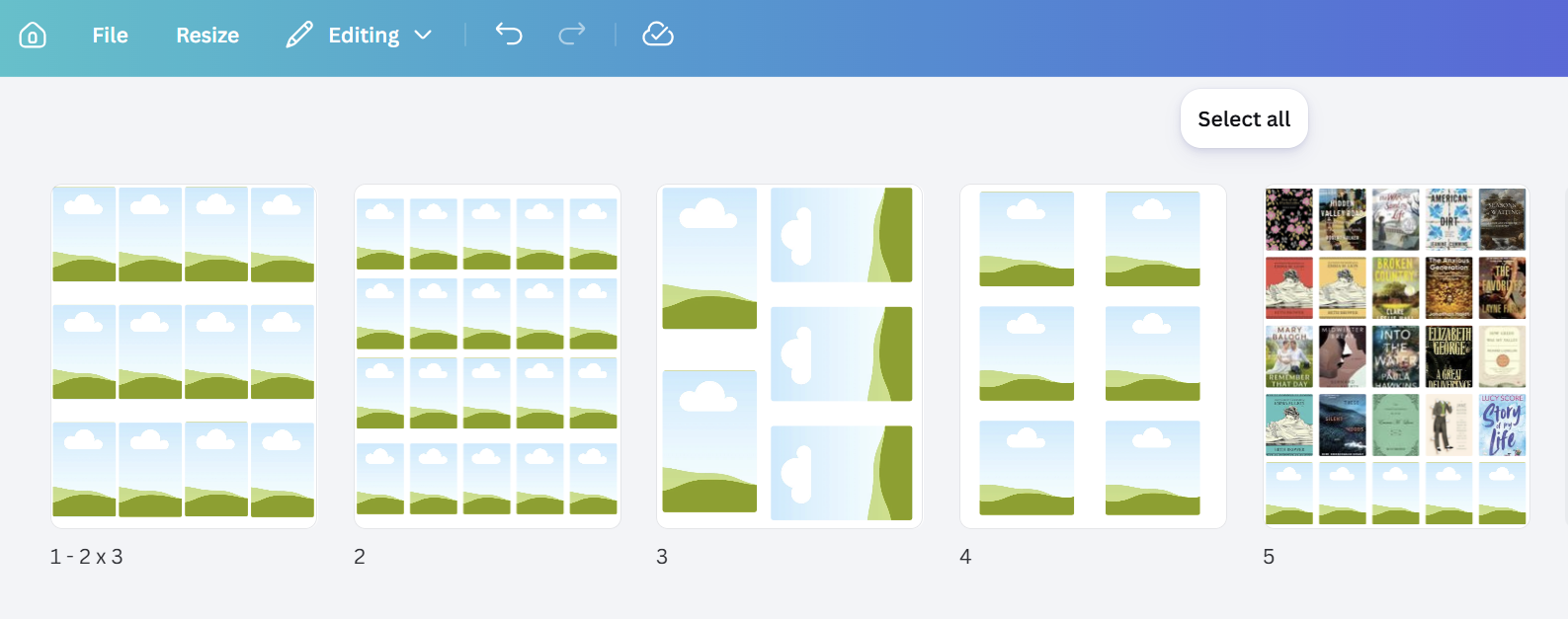
The template includes pages for four cover sizes and a sample completed page.
Ways to Use Miniature Book Covers in the Classroom
1. Create a visual reading log
Students can add a miniature cover to a notebook or reading journal each time they finish a book. They might write the date completed, add a star rating, or record one sentence about the book beneath the cover. Over time, the pages become a visual history of the student’s reading life.
2. Celebrate the books a class has read
Create a class display and add a cover whenever a student finishes a book. You could include every book read by the class or add each title only once. Either approach makes reading visible and gives students new books to ask one another about.
3. Build student recommendation boards
Invite students to choose a book they would recommend and place its cover on a bulletin board. Add a small card with the student’s name and a brief reason for the recommendation. The covers make the display easy to browse, and recommendations from classmates often carry more weight than a general list from the teacher.
4. Make personalized next-read collections
Choose several books that might appeal to a particular student and arrange the covers on a page. A personalized set of possibilities can feel much more inviting than being told to walk around the library until something looks interesting. Students can also create next-read collections for themselves or for a classmate.
5. Study what covers communicate
Book covers offer a compact lesson in visual literacy. Ask students to examine the colors, fonts, images, symbols, and placement of the title. What does the design suggest about the genre, tone, setting, conflict, or intended audience? After reading the book, students can decide how accurately the cover represents it.
6. Make predictions before reading
Give students a selection of covers without summaries. Ask them to choose one and predict what the book may be about. Require them to support each prediction with evidence from the design. Students can revisit their predictions after reading an excerpt or learning more about the book.
7. Sort books into categories
Print a mixed collection of covers and have students sort them. The categories might be familiar ones such as genre, fiction and nonfiction, historical period, or point of view. For more complex thinking, allow students to create their own categories and explain the reasoning behind them. The same book may fit more than one group, which can lead to an especially useful discussion.
8. Build a text set
Use the covers to introduce a group of books connected to a common topic, theme, essential question, historical era, or scientific idea. Students can look for patterns across the collection and predict how each text may contribute something different. Mixing fiction, nonfiction, poetry, biography, and graphic novels makes the set even richer.
9. Create a character bookshelf
Ask students to choose books that a fictional character, historical figure, or real-world leader might keep on a personal bookshelf. Each choice should reveal something about that person’s interests, experiences, needs, or goals. Students can arrange the covers and write a short explanation for each selection.
10. Compare different editions
Many books have been published with several covers over time or with different designs in different countries. Print several versions of the same title and ask students which audience each seems designed to reach. They can evaluate which cover best captures the book and support their judgment with evidence.
11. Create a book-cover autobiography
Students can select covers that represent their lives as readers. They might include an early favorite, a book connected to an important memory, a title that changed their thinking, a comfort read, and a book they hope to read someday. The finished collection can become a low-pressure way for students to share something about themselves.
12. Design a dream classroom library
Challenge students to select the books they believe belong in an ideal classroom library. You can set a limit, require several genres or perspectives, or ask students to build a collection for a particular grade level. Because space is limited, students must establish priorities and defend their choices.
13. Find the book that does not belong
Arrange several related covers and add one possible outlier. Students identify which book does not belong and explain why. The best versions of this task allow more than one defensible answer. One student may group the books by genre while another notices setting, author, theme, or audience.
14. Map connections among books
Place one cover in the center of a page and surround it with related titles. Students can connect books through theme, setting, conflict, character type, author, historical context, or writing style. Add lines and labels to show the nature of each connection.
15. Make a reading yearbook
At the end of a semester or school year, students can choose the books they most want to remember. They might include a favorite, a surprise, a disappointment, a challenge, a book that made them laugh, and a book they would recommend to next year’s class. Together, the covers tell the story of the year.
How to use the Canva template
- Open the template link and choose Use template for new design so your edits are made in your own copy.
- Find an image of the cover you want to use and save it to your device. I usually get mine from Goodreads. For classroom projects, students can gather their covers before beginning the Canva page.
- Upload the cover image to Canva.
- Drag the uploaded image onto one of the placeholder frames. Canva will automatically crop it to fit.
- Double-click the cover if you need to reposition or resize it inside the frame.
- Continue until you have filled as many spaces as you need. You do not have to complete the entire page.
- Download the page as PDF Print for the most dependable sizing and print it at 100 percent or Actual Size. Avoid options such as Fit to Page, which may change the dimensions.
- Cut out the covers and use them in journals, displays, sorts, collages, or other activities!
▶️ CLICK HERE FOR THE CANVA TEMPLATE
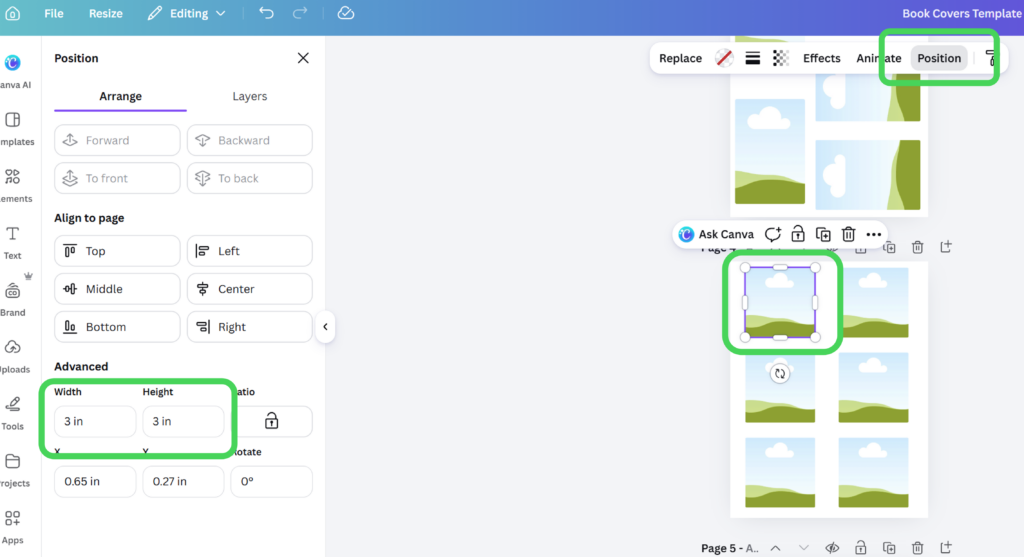
If you would like to change the size to make a specific size for your purposes, it’s easy to do that.
- Click on the image frame.
- Select “position.”
- Change the size in the “Advanced” section on the left.
A small tool with big possibilities
There is something satisfying about seeing a group of book covers together. They invite browsing, make patterns easier to notice, and remind students that a reading life is made up of many individual experiences. I like to open up my reading journal and just stare at it.
Start with a simple reading log or recommendation display, then let students suggest other uses. Once they have a page of miniature covers in front of them, they will probably think of possibilities neither of us has considered yet!
Links for you:
- Canva template
- Supplies I use for my reading journal (this is my Amazon page, so the links are affiliate links)